The problem with a static site
This site is plain HTML on shared hosting. There's no Node server and no framework, which keeps it simple and cheap to run, but it creates the first problem: a browser isn't allowed to read another website's HTML or headers. That's the browser's same-origin policy, and it's there for good reason. Without it, any site you visited could read pages you're logged in to elsewhere.
A QA tool needs both. It needs the raw HTML to check titles and alt text, and the response headers to check compression, caching and security. So something on the server has to do the fetching.
My host runs PHP, so the answer was one small PHP file, api.php, that fetches what the browser can't and returns plain facts as JSON. Everything else happens in the browser.
A small PHP fetcher
The endpoint has three jobs:
- page: fetch the URL (following redirects), plus robots.txt, the sitemap, the favicon, a made-up URL to test the 404 page, the http:// version to test the redirect, and the SSL certificate.
- check: take up to 50 URLs and return each one's status, final address, type and size. This is how every link and image gets checked.
- pages: fetch up to a dozen more pages and summarize their title, description and H1, so the report can spot duplicates.
All of it runs on curl_multi, so dozens of requests go out in parallel and a whole page of links is checked in a few seconds. Link checks start with a lightweight HEAD request and fall back to a small GET, because a surprising number of servers answer HEAD incorrectly.
Not becoming an open proxy
A server that fetches any URL a stranger types in is dangerous. Without care, someone could ask it to fetch http://localhost, the hosting company's internal network, or a cloud metadata address. That class of attack is called SSRF, and it was the part of the build I spent the most care on.
Every request, and every redirect hop, goes through the same gate:
function safe_target(string $url): array
{
    $p = parse_url($url);
    $scheme = strtolower($p['scheme'] ?? '');
    if ($scheme !== 'http' && $scheme !== 'https') throw new RuntimeException('Only http and https.');

    $port = $p['port'] ?? ($scheme === 'https' ? 443 : 80);
    if ($port !== 80 && $port !== 443) throw new RuntimeException('Only standard web ports.');

    $ips = gethostbynamel($p['host']) ?: [];
    foreach ($ips as $ip) {
        if (!is_public_ip($ip)) throw new RuntimeException('That address points to a private network.');
    }
    // Pin the connection to the IP we just checked
    return ['resolve' => $p['host'] . ':' . $port . ':' . $ips[0]];
}
Three details matter here:
- Redirects are followed by hand, not by curl, so a public URL can't redirect the server somewhere private.
- The DNS answer is pinned with
CURLOPT_RESOLVE. Otherwise a domain could resolve to a public IP when I check it and a private one when curl connects. - Everything is capped: response sizes, timeouts, the number of URLs per request, and the number of audits per visitor per hour.
Analyzing in the browser
The PHP side only collects facts. The browser does the thinking. It parses the fetched HTML with DOMParser, which builds a document without running any of its scripts or loading its images, then runs around a hundred checks across six sections: performance, SEO, accessibility, security, links and images, and content.
Keeping the logic in JavaScript meant I could iterate quickly and test every check against a deliberately broken page full of planted problems. Each check returns a status, a short explanation, a fix, and the exact items affected, and the report is built from those.
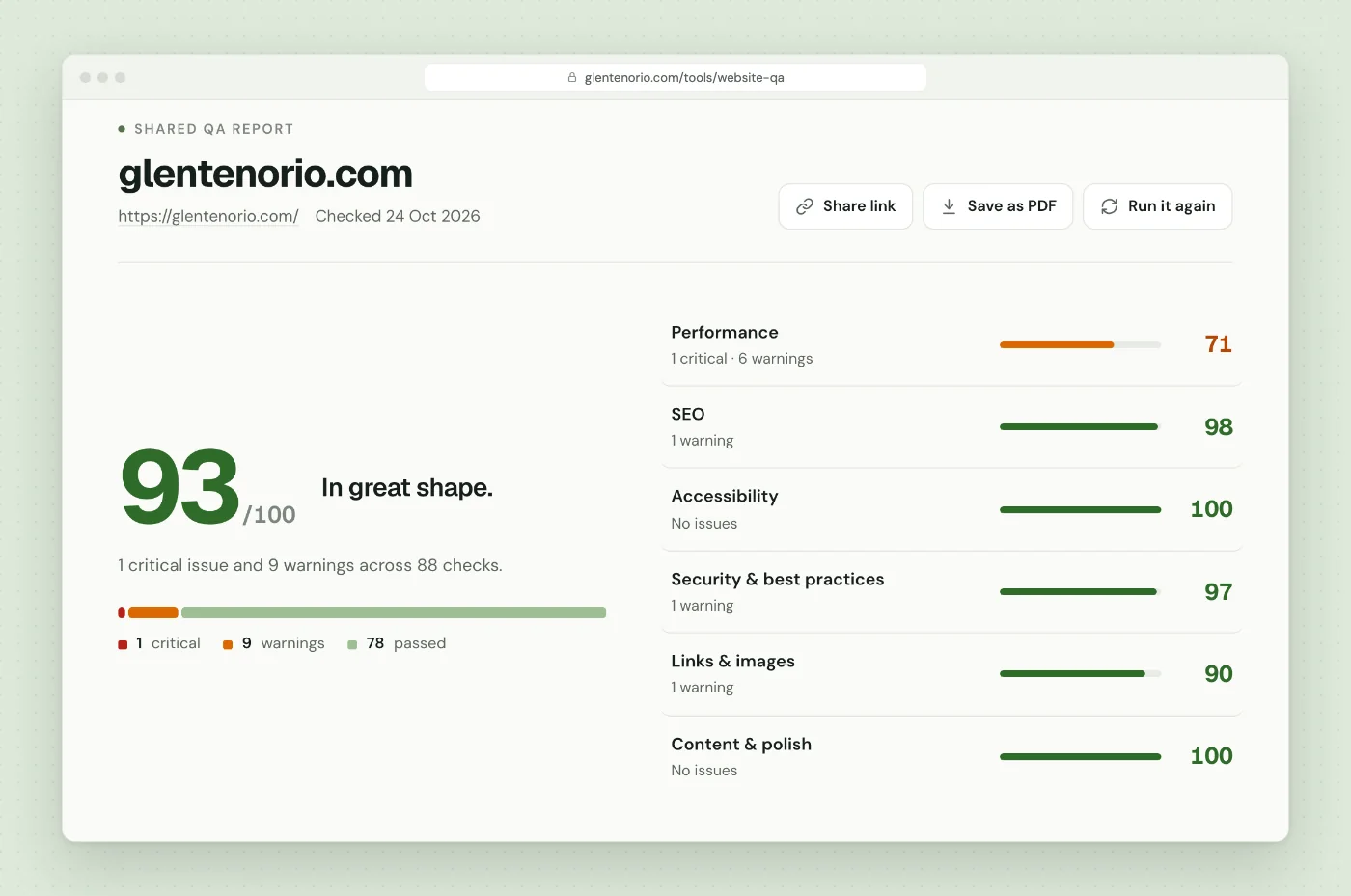
Some checks are about honesty rather than detection. Links to LinkedIn or Facebook usually return errors to automated requests, so instead of calling them broken, the report says they "couldn't be verified". A false alarm in a QA report costs more trust than a missed warning.
Adding Lighthouse
The speed scores come from Google's PageSpeed Insights API, which runs Lighthouse on Google's servers. The browser calls it directly for mobile and desktop in parallel, while the PHP checks are running, so the slowest part of the audit overlaps with everything else.
I wrote up the details, including the quota and key traps, in a practical guide to the PageSpeed Insights API.
Shareable reports
A QA report is most useful when you can send it to someone. When an audit finishes, the browser sends a slim snapshot of the results to the server, which saves it under a random ten-character ID and returns a link like /tools/website-qa/?r=Ab3dE5fGh7.
Opening that link loads the snapshot instead of re-running anything, so the person you send it to sees exactly what you saw, instantly.
The part I took most care over: a saved report is data from the server, and someone could craft a malicious one through the API. So a shared report is never trusted. It's rebuilt field by field, with types checked, URLs restricted to http and https, and every piece of text escaped. Only <code> tags and https links survive:
function safeHtml(s) {
return escapeHtml(s)
.replace(/<(\/?)code>/g, '<$1code>')
.replace(/<a href="(https:\/\/[^"<>\s]+?)" target="_blank" rel="noopener">/g,
'<a href="$1" target="_blank" rel="noopener">')
.replace(/<\/a>/g, '</a>');
}I tested it by saving a report full of script tags, event handlers and javascript: links, and checking that none of them survived into the page.
Page previews
The report shows desktop and phone screenshots of the audited site. My first attempt used a free screenshot service that turned out to refuse many sites and serve its own "404" picture instead. I switched to Microlink for the captures, then shrink each one to WebP on a canvas and store it inside the saved report, so shared links keep their pictures after the service's own links expire.
Two lessons came out of this. Some sites block every automated browser and serve an "access denied" page, so the tool now spots captures that are almost entirely blank and says the site blocked the preview, instead of showing a picture of an error. And free screenshot services have daily limits, so once the PageSpeed key was in place I made Lighthouse's own screenshots the first choice and Microlink the fallback.
What broke, and what I learned
- Firewalls block data centers. Sites behind Cloudflare, Sucuri and similar services often refuse requests from hosting servers. Rather than auditing a "prove you're a browser" page, the tool now recognizes the common ones and tells you which IP address to allowlist.
- Tech detection by keyword lies. My first version decided my own site was built with Elementor because a page mentioned the word. It now looks for actual plugin file paths and class names.
- Google changes things without warning. When Lighthouse 13 arrived, one audit's data changed shape and crashed the report. Each audit is now parsed on its own, so one surprise can't break the rest.
- The design has to earn trust too. The first report was a stack of translucent cards over the forest background and looked cheap. Rebuilding it as one solid sheet, with clear hierarchy and the issues ranked by impact, made the same data feel far more credible.
Wrapping up
The whole tool is one PHP file of around 700 lines, one JavaScript file and one stylesheet, running on ordinary shared hosting. The interesting work wasn't the checks themselves; it was everything around them: not becoming an open proxy, not trusting saved data, and not crying wolf about links and screenshots.
If you want to see the result, run an audit on your own site. And if you'd like the manual half of the process too, it's in how I QA a website before handover.
Keep reading
A Practical Guide to the PageSpeed Insights API
How to call the PageSpeed Insights API, read the Lighthouse JSON, understand the scores, and avoid the quota, API key and Lighthouse 13 traps.
Read the post GuideHow I QA a Website Before Handover (My Actual Checklist)
The pre-launch QA checklist I run on every website before handover, from content and forms to SEO, speed and go-live, and the order I run it in.
Read the post Free toolWebsite QA Audit
Paste a URL and get a full QA pass: speed, SEO, accessibility, security, broken links and content slips, with a fix for each issue.
Run an audit