What Core Web Vitals are
Google measures three things about how a page behaves for real visitors. Together they're called Core Web Vitals, and they're part of how Google evaluates page experience.
They're worth understanding even if you never touch code, because they put numbers on the complaints people already make: "the site is slow", "it doesn't respond when I tap", "the button moved and I clicked an ad".
Each one has a "good" threshold. Google measures them at the 75th percentile of visits, which in practice means three out of four visits need to hit the target.
LCP: how quickly the main content appears
Largest Contentful Paint is the time until the biggest thing on the screen has loaded. On most pages that's the hero image or the main heading.
It's the closest of the three to what people mean by "fast". Good is 2.5 seconds or less. Over 4 seconds is poor.
The usual causes of a slow LCP, roughly in the order I find them:
- A huge hero image. A photo straight off a camera or a stock site, several megabytes, scaled down by the browser.
- A slow server. If the first byte takes a second to arrive, everything else starts a second late.
- Render-blocking files. Fonts, stylesheets and scripts that must load before anything can be drawn.
- The hero image is discovered late. For example, when it's set as a CSS background, the browser only finds it after the stylesheet has loaded.
INP: how quickly the page responds
Interaction to Next Paint measures how long the page takes to visibly respond after you tap, click or type. It looks across the whole visit, not just the first click.
Good is 200 milliseconds or less. Over 500 milliseconds is poor, and it feels like the page ignored you.
Slow responses almost always come from too much JavaScript running at once. Common culprits are chat widgets, tag managers loading a dozen trackers, heavy sliders and page builder animations.
CLS: whether the page jumps around
Cumulative Layout Shift measures how much the content moves unexpectedly while you're looking at it. You've seen it: you go to tap a link, an image loads above it, and you tap something else.
It's a score rather than a time. Good is 0.1 or less. Over 0.25 is poor.
The fixes are usually simple:
- Give images and videos their dimensions. A
widthandheighton the tag lets the browser reserve the space before the file arrives. - Reserve space for ads and embeds. An ad slot that appears from nothing pushes everything below it down. I cover one way to handle ad slots in ads.txt and AdSense on a static site.
- Load web fonts sensibly. A fallback font that's very different in size makes text reflow when the real font arrives.
- Don't inject banners above existing content. Cookie notices and promo bars should overlay or sit at the bottom.
<!-- The browser can reserve a 16:9 box before the image downloads -->
<img src="hero.webp" width="1600" height="900" alt="Our workshop in Fremantle">
Lab data vs real visitors
When you run PageSpeed Insights, you can see two kinds of numbers, and they often disagree.
- Field data ("Discover what your real users are experiencing") comes from the Chrome UX Report: real Chrome users over the last 28 days. This is what Google uses for Core Web Vitals. Small sites often don't have enough visitors to show it.
- Lab data (the Lighthouse score) is a single simulated visit on a throttled phone connection. It's repeatable and great for finding problems, but it isn't what your visitors experienced.
Use the lab test to find and fix problems. Use the field data to confirm the fix worked for real people. And don't panic when the Lighthouse score moves a few points between runs; it always does.
What to fix first
If you only have time for a few things, this is the order I'd go in on most small business sites:
- The largest image above the fold. Resize it to the size it's actually shown at, convert it to WebP, and compress it. This is the single biggest LCP win on most sites I look at.
- Hosting and caching. If the server takes over a second to respond, turn on page caching or move to better hosting before tuning anything else.
- Third-party scripts. Remove trackers and widgets nobody uses any more, and delay chat widgets until after the page has loaded.
- Image dimensions and reserved space. The cheapest fix for layout shift.
- Fonts. Fewer weights,
font-display: swap, and preloading the one font used above the fold.
A real example from this site
When I built the Website QA tool, the first site I audited with it was this one. Lighthouse's mobile test gave my homepage a Largest Contentful Paint of 16.6 seconds. Not a great look for someone whose homepage says he builds fast websites.
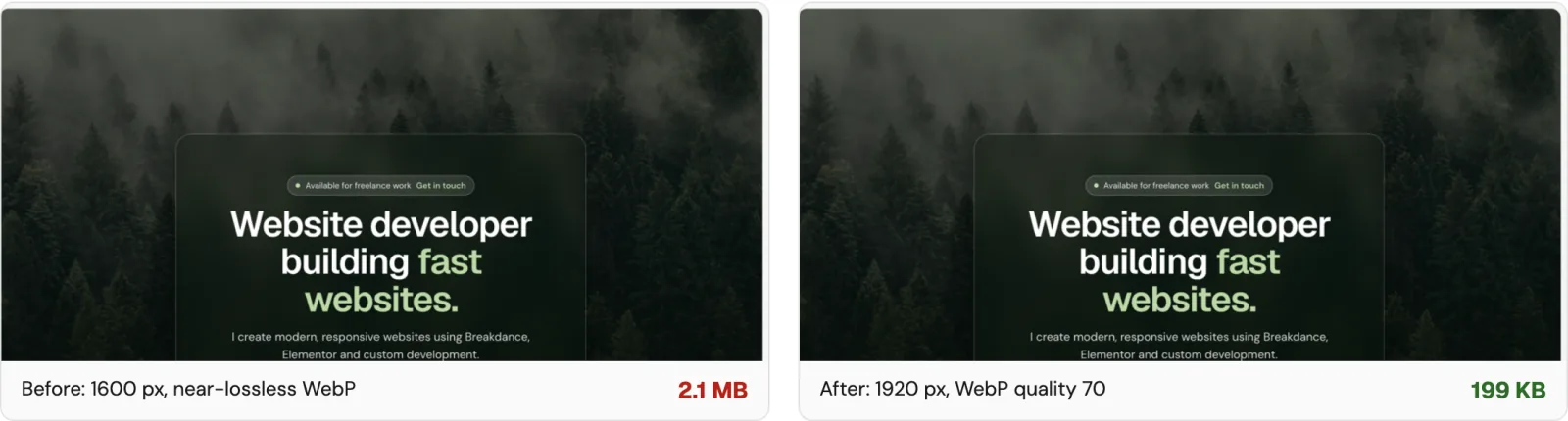
The cause was exactly what this post describes. The forest background behind the homepage was a 1600 pixel wide WebP saved at near-lossless quality: 2.1 MB, for an image that sits under a dark overlay where nobody could see the extra detail.
I re-exported it from the original photo at 1920 pixels wide and quality 70. The new file is 199 KB, about 91% smaller and slightly sharper on large screens. A pixel comparison of the homepage before and after showed no visible difference. The page now downloads 0.8 MB in total instead of 2.7 MB.
# Resize to 1920px wide and encode as WebP at quality 70
cwebp -resize 1920 0 -q 70 -m 6 trees.jpg -o trees.webp
After the change went live, PageSpeed Insights' mobile test put the homepage's Largest Contentful Paint at 7.6 seconds, down from 16.6, with the page weighing 754 KB instead of 2.7 MB.
That's a big improvement, and it's still well over the 2.5 second target, which is the honest part of this example. With the image fixed, the remaining delay is render-blocking files: the stylesheet, two scripts and the Google Fonts request all have to load before anything appears. That's the next fix on my list.
There's a second lesson in it too. The image is a CSS background, so the browser only discovers it after the stylesheet loads. A smaller file helps a lot, but for a hero that matters, an actual <img> with fetchpriority="high" gets it started sooner.
Wrapping up
You don't need to understand JavaScript to improve Core Web Vitals. Most of the gains on small sites come from images, hosting and removing scripts nobody needs.
Run your site through PageSpeed Insights or my free QA tool, start with the largest image, and re-test after each change so you know what actually helped.
Keep reading
A Practical Guide to the PageSpeed Insights API
How to call the PageSpeed Insights API, read the Lighthouse JSON, understand the scores, and avoid the quota, API key and Lighthouse 13 traps.
Read the post TutorialSetting Up ads.txt and AdSense on a Static Site
How to add ads.txt and a manual AdSense ad unit to a hand-coded static site, hide empty ad slots, set up consent, and pass the AdSense review.
Read the post Free toolWebsite QA Audit
Paste a URL and get a full QA pass: speed, SEO, accessibility, security, broken links and content slips, with a fix for each issue.
Run an audit